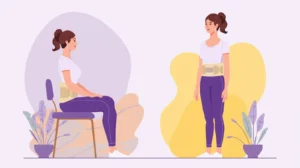






The state of your desk might not seem hazardous; no sharp instruments or heavy machinery in sight. But for millions of people, it is the backdrop to slow, chronic stress. Hours spent sitting in a terrible posture, putting stress on your neck, back and shoulders, silently wear away at you whilst you work.
If you work at a desk most days, you probably spend on the order of 2,000 hours per year seated. Small posture habits, like leaning in toward the screen, rounding the lower back or resting wrists at odd angles to type can all build up over time. Without that supportive ergonomic sitting position, these repeated misalignments can over time lead to stiffness, fatigue and even chronic pain.
The good news, however, is that you don’t need to overhaul your entire office or buy expensive new furniture in order to improve your ergonomic seating position. A handful of mindful tweaks to the way you sit, move and support your body can dramatically reduce strain and make you feel better during work hours and long after you log off..
Let’s look at how your work space may be stealthily harming you and what, precisely, you can do about it.
What Is Workplace Ergonomics and Why Is It Important?
Ergonomics in the workplace
Enter the field of workplace ergonomics, which is all about building spaces that encourage the natural positioning and movement of our bodies and less strain means better comfort and productivity. Rather than making your body conform, ergonomics conforms to the environment.
OSHA lists bad ergonomics as a primary form of workplace hazard, which is associated with musculoskeletal health problems including back pain, tendinitis and carpal tunnel syndrome [1]. And beyond protecting you from injury, good ergonomics makes focus, energy and productivity possible, minus the constant pain-induced stress on the brain. Ergonomic interventions are demonstrably shown to lower pain and improve work performance [2].
How Desk Setup Affects Your Spine ?
Your back is optimized for load distribution with natural curves. A bad desk set-up messes with this alignment creating stress which will cause pain over time.
Low screen height is associated with forward head posture, which adds significant stress to the neck and induces pain and headaches among individuals [3]. Without proper lumbar support, the lower back will be forced to round which could strain spinal discs and ligaments. Poor arm placement also contributes by raising the shoulders and tensing up in the neck and upper back. You put the spine in the head and from the hips to the hip.” (Not just support from lower back.)
What Are the Typical Posture Mistakes at Work?
Knowing what not to do is just as important as knowing what to try. Here are some rampant mistakes in today’s workplaces:
The Forward Head Lean:
Possibly the most pervasive of all desk posture mistakes, this is when you poke your head forward towards your screen. Your head only weighs 10-12 pounds when it’s in a neutral position, but that effective weight multiplies exponentially when you lean forward. At 15 degrees forward angle, your neck is supporting the equivalent of 27 pounds of force; at 60 degrees (very common when looking at a phone or low monitor), the force it’s supporting soars to 60 pounds [3].
The Shoulder Hunch
Raised shoulders (whether from too high armrests, reaching for a mouse that’s too far, or just general tension) cause chronic tightness in the upper trapezius muscles.This leads to tension headaches and it cuts off blood flow to the arms.
The Slouch:
The Slouch Rounding of your lower back and collapse of your chest, pelvis tilted backward. (That means a C-shaped spine instead of natural curves.) This posture raises pressure on the vertebrae discs by 80-90% as compared to standing [4].
The Crossed-Leg Twist:
Yes, crossing your legs, or sitting on a wallet in your back pocket can create asymmetry at the pelvis, which sends weirdness up your spine and finds an adjacent place to compensate with curves or muscles.
Static Sitting:
Regardless of the quality of your posture, sitting for too long is damaging. Your muscle loosens, blood flow slows down and metabolic functions you need active motion for get dull.
Everyday Habits That Cause Pain
Daily practices exacerbate ergonomic issues, in addition to structural setup woes:
Slumping is the condition into which core muscles collapse due to disuse. When you slump, your muscles adjust to that position and good posture feels uncomfortable and requires effort to maintain.
Forward head posture doesn’t happen overnight. It develops over time as you unconsciously lean in toward your screen, especially if text is too small or lighting is poor. Some people don’t know how far forward their head has come until it hurts.
Hours of static sitting without breaks is a recipe for disaster. There is stasis of blood in the legs as a result of decreased circulation. Muscles are held in shortened positions or lengthened ones for prolonged periods of time and that’s when trigger points begin to develop and tightness ensues. Metabolism slows, and the body goes into a state of low-energy output that involves everything from digestion to clarity of mind.
How Can Poor Ergonomics Cause Neck, Back, and Wrist Pain?
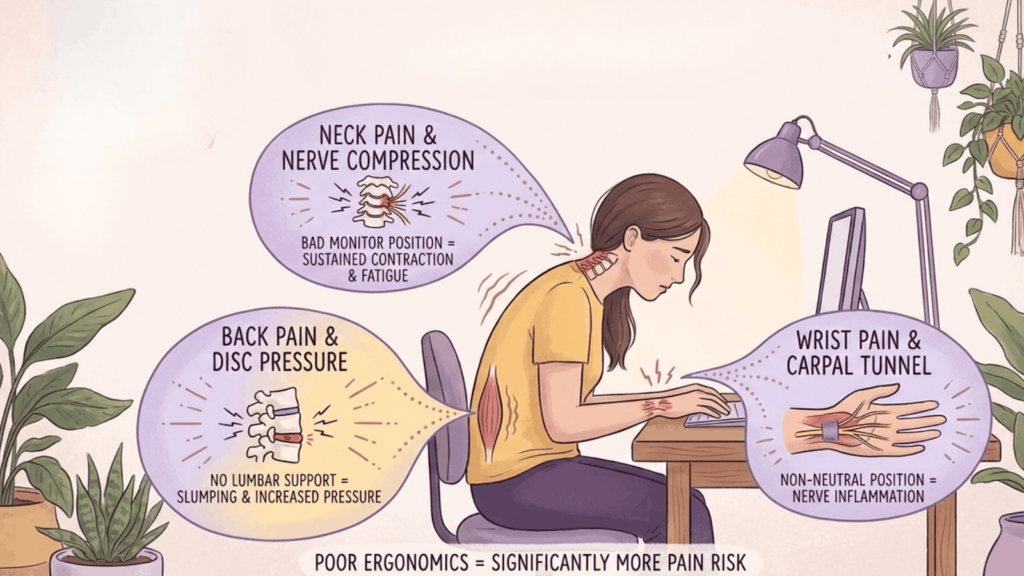
The relationship between how you set up your workspace and your pain probably seems straightforward, but the mechanics are worth understanding. Knowledge is power, especially when it comes to prevention.
Neck Pain:
If the monitors are positioned badly, this can cause chronic contraction of muscles in your neck extensors (muscles that go down the back of your neck) and also flexors (your neck muscles at the front). This is not what these muscles are designed to do, nor should we train them in such a static manner. Sustained contraction leads to muscular fatigue, trigger point development and eventually a chronic pain presentation. Furthermore, forward head posture compresses the nerve roots of the cervical region and is likely to produce referred pain in shoulders and arm.
Back Pain:
Without proper support in the lumbar region of your back, still too much pressure is imposed on the lower back muscles to allow slumping to occur. This results in muscle fatigue and stress. At the same time, bad sitting posture can cause increased intradiscal pressure which is the pressure contained within spinal discs. Studies have shown that disc pressure when sitting is approximately 40% higher than when standing, and slouched postures increase the pressure even more [4]. With time, this premature disc wear leads to degenerative disc disease and herniation.
Other effects of poor spinal mechanics is rounding out of the thoracic spine (mid-back) and a collapsed chest position which stretches the muscles between shoulder blades and results in burning, achy pain.
Wrist pain:
Repetitive strain injuries such as carpal tunnel syndrome occur when the wrist is held in a non-neutral position while keyboarding or mousing. When your wrist is bent back (extension) or forward (flexion), or angled sideways, the carpal tunnel; a narrow canal located in your wrist, narrows and compresses the nerve that runs through it. Add to this that you do the same few motions very many times over thousands of keystrokes day after day, and inflammation follows. And with it, pain or numbness or tingling.
Findings Based on a comprehensive review, workers who had poor ergonomics in the office had significantly more neck, shoulder and lower back pain than those with good arrangements [5].
How to Improve Posture at Work ? The Easy Way
The wonderful thing about ergonomics is that minor changes can make a big difference. You don’t need fancy gear, you just need to be purposeful.
Chair & Foot Positioning
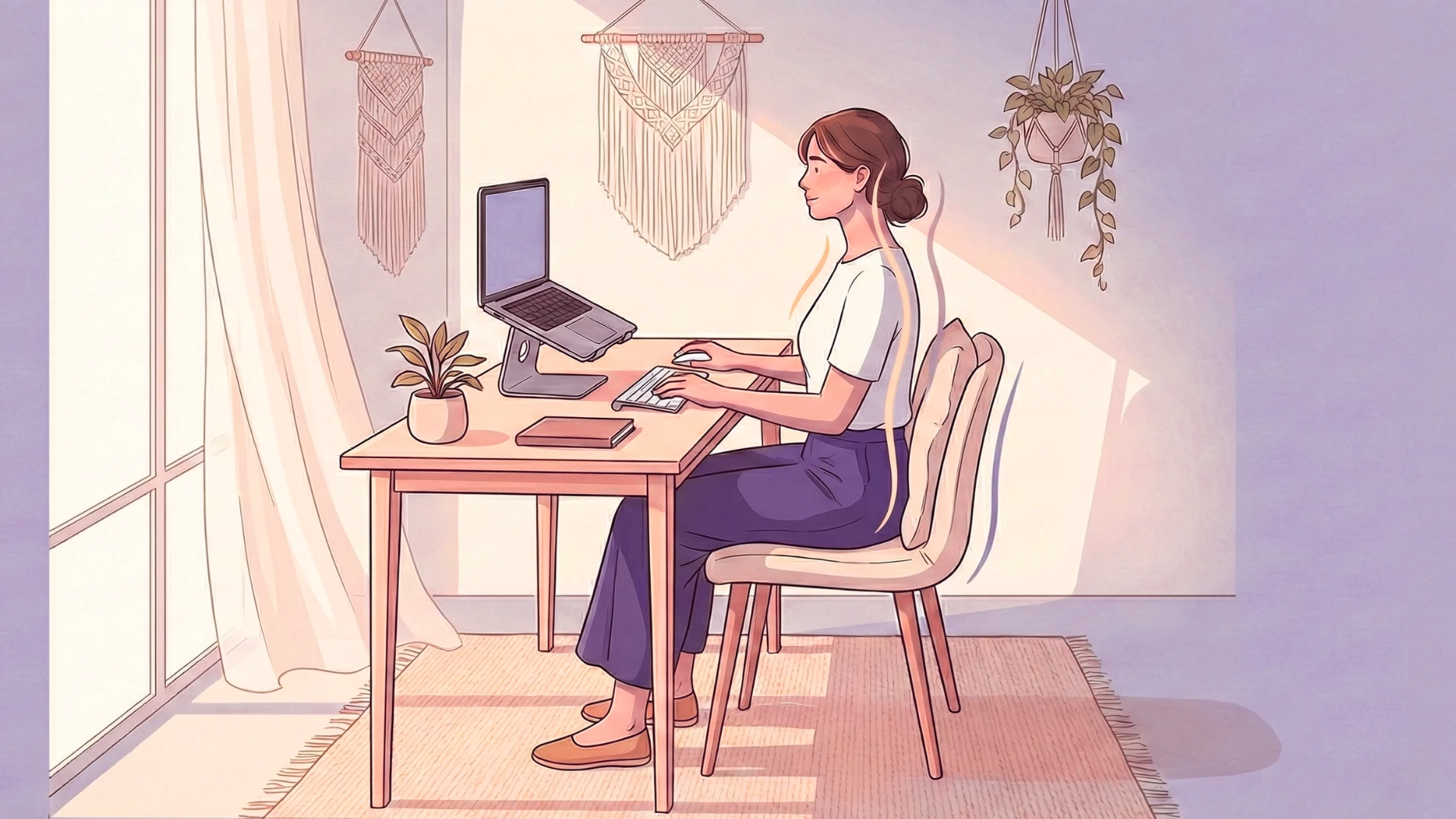
Chair Height: Your feet should be flat on the floor (or a footrest), with your knees at about 90 degrees and your hips slightly higher than your knees. This will help you keep your pelvis in the right position and keep that lumbar curve. If your chair has armrests, they should be positioned to let your shoulders relax but not so high that your elbows can’t rest down while seated.
Pro tip: When sitting all the way back in your chair, you should leave 2-3 fingers’ worth of space between the back of your knees and the edge of the seat to keep from constricting circulation.
Foot Positioning: Your feet must be flat or on a footrest. When your feet are dangling, it leads to pressure on the bottom of your thighs which interferes with blood circulation. If you have a set desk height but your chair is too low to plant your feet on the ground, invest in a foot rest for support.
Screen & Desk Setup
Monitor Positioning: -Your screen should be positioned with the top edge at or 2-3 inches below eye level and approximately an arm’s length (20-26″) away. This controls neck flexion (looking down) and extension (looking up). The center of your screen should be at your natural, straight ahead gaze.
For laptop users (for whom ergonomics tend to be particularly bad), perch your laptop on a stand or some books, so the screen is at the right height for you and use an external keyboard and mouse at desk level.
Keyboard and Mouse Placement: Place your keyboard at a height that allows your elbows to rest comfortably at 90 degrees with shoulders relaxed, NOT hunched up. As you type, your wrists should rest in a neutral position (straight and not bent up, down or sideways). If your desk height results in your shoulders hunching up, look at a keyboard tray.
You mouse should be next to your keyboard, its distance from you such that you don’t have to reach. Reaching out time and again, even a few inches here or there, causes stress on the shoulder over thousands of repetitions. For some people, alternating which hand they use the mouse with or using a vertical mouse that keeps the wrist in a more neutral position are helpful.
Foot Positioning: Your feet must be flat or on a footrest. When your feet are dangling, it leads to pressure on the bottom of your thighs which interferes with blood circulation. If you have a set desk height but your chair is too low to plant your feet on the ground, invest in a foot rest for support.
How Often Should You Move During Work Hours?
Here’s a horrifying fact: Sitting is the new smoking. Despite perfect set-up, overly prolonged static sitting increases risk of several health conditions such as CVD, metabolic syndrome and mortality [6].
The answer isn’t probably a standing desk (though that does help), it’s staying on the go all day long. A study suggested that the optimal pattern was to engage in light exercise for 2-3 min every 30 min of sitting [7].
Practical movement strategies:
- The 20-20-20 Rule: Every 20 minutes, take 20 seconds to look at something that is 20 feet away. That makes for less eye strain and encourages you to move things around.
- Micro-Breaks: Schedule every 30 minutes using a timer. Get up, stretch, walk to the water fountain and move your body while sitting. It can help muscles maintain their flexibility and prevent them from “setting” in a static position.
- Walking Meetings: If you can, take your phone calls while walking or propose walking meetings for brainstorming.
Desk Stretches Do easy stretches in your day:
- Neck rolls: Roll your head in circles, softly massaging any neck tension
- Shoulder shrugs: Raise and drop your shoulders to alleviate tension in your upper back
- Seated twist: Twist at your waist while seated to energize your spine
- Wrist Circle: Rotate your wrists to offset repetitive keyboard positioning
- Chest opener: Press hands together behind back and look up to give chest muscles in the front of your body a stretch in the opposite direction from the one taken by keyboard posture.
Postural Reset:
Each hour (set an alarm to remind you), do a check: Sit all the way back in your chair, roll shoulders down and back, spine tall but relaxed yet long (read not looking at the ceiling), keep your chin slightly tucked; though I’m not talking chin-to-chest here and take three deep breaths. This brief reset will help you maintain good posture and break the patterns that cause pain.
Standing Desk Notes:
If you are a user of a standing desk, have in mind that static standing can be as harmful as static sitting. The secret is to mix it up; sit and stand once every 30-60 minutes. While you are standing, has an anti-fatigue mat during usage; if while standing on gel it is important to put one foot up on a footrest occasionally so lower back compression can be relieved.
A trial reported in the British Medical Journal indicated that sit-stand desk interventions decreased sitting time and musculoskeletal pain, while increasing work engagement [8]. It’s not necessarily about standing, it’s actually the fact that you are moving and changing positions.
Conclusion: The Importance of Ergonomics More Than You Think
In both cases, the prescription isn’t fancy furniture but rather smart alignment and regular movement. By providing you with relief and improving your posture so that staying put isn’t so much of a strain, your workspace is doing more good than harm over time.
Small adjustments add up. Lifting your screen, better support for your chair, typing at the right height and breaking up periods of inactivity can all reduce the possibility of chronic neck, back and shoulder problems. Pain is your body’s early warning system and the earlier you deal with it, the much easier recovery will be. With the proper arrangements, your workday can be pleasant, productive and painless.
How betterhood Helps You Protect Your Body at Work
betterhood is about everyday wellness and helps with reducing posture strain and recovery from your workday. We design our ergonomic products to fit living environments the new way people work and play.
That’s why betterhood brings you better tools for feeling supported all day long; not just after work- from posture support tools to recovery essentials that help you release the tension built up during the hours of sitting. Because lasting comfort is influenced by how you move, sit and work every single day.
Explore More Health & Wellness Solutions:
Would you like to be up-to-date on everyday health and wellness issues? Here are some interesting pieces to help you. Follow the links below if you want practical tips or solutions:
- What Causes Back Pain? Understanding Root Triggers & Prevention Tips
- 10 Effective Home Remedies for Body Pain Relief Naturally
- Wrist Support Braces Explained: Protocols for Pain Relief
- Pillow for Neck Pain: Best Contour Pillow Every Side Sleeper Needs
Frequently Asked Questions
Yes. Long-term slumping puts additional stresses on muscles and joints, leads to a lack of balance and unhealthy motion that can cause pain over time. Forward head posture and other poor postures can contribute to ongoing back or neck pain, though it is not the sole cause.
Try to get up and stretch once an hour, if only for a minute or 30 seconds. Simple exercises along with 5 to 10 minutes of dedicated stretching both in the morning and at night can help counteract much of the stiffness that results from sitting all day.
Neither is superior in isolation — movement and variety are what count the most. Standing and sitting every 30-60 minutes will ease tension, promote healthy circulation, and prevent the negatives that come from being in any position for too long.
The greatest chair will support your spine’s natural curve, be adjustable and keeps your feet flat with relaxed shoulders. Although the nicest chair in the world won’t do you any good if it’s not properly adjusted and used for your posture.
Yes. More efficient posture helps release unnecessary muscle tension, facilitates breathing and circulation. When your body is functioning more optimally, you’re naturally less tired and have more energy throughout the day.
References
- Occupational Safety and Health Administration. (2023). Ergonomics. U.S. Department of Labor. https://www.osha.gov/ergonomics
- Gerr, F., Marcus, M., & Monteilh, C. (2004). Epidemiology of musculoskeletal disorders among computer users: lesson learned from the role of posture and keyboard use. Journal of Electromyography and Kinesiology, 14(1), 25-31. https://doi.org/10.1016/j.jelekin.2003.09.014
- Hansraj, K. K. (2014). Assessment of stresses in the cervical spine caused by posture and position of the head. Surgical Technology International, 25, 277-279. https://pubmed.ncbi.nlm.nih.gov/25393825/
- Nachemson, A. L. (1981). Disc pressure measurements. Spine, 6(1), 93-97. https://doi.org/10.1097/00007632-198101000-00020
- Griffiths, K. L., Mackey, M. G., Adamson, B. J., & Bancroft, L. M. (2007). The impact of a computerized work environment on professional occupational groups and behavioural and physiological risk factors for musculoskeletal symptoms: a literature review. Journal of Occupational Rehabilitation, 17(4), 743-765. https://doi.org/10.1007/s10926-007-9108-x
- Biswas, A., Oh, P. I., Faulkner, G. E., Bajaj, R. R., Silver, M. A., Mitchell, M. S., & Alter, D. A. (2015). Sedentary time and its association with risk for disease incidence, mortality, and hospitalization in adults: a systematic review and meta-analysis. Annals of Internal Medicine, 162(2), 123-132. https://doi.org/10.7326/M14-1651
- Torbeyns, T., Bailey, S., Bos, I., & Meeusen, R. (2014). Active workstations to fight sedentary behaviour. Sports Medicine, 44(9), 1261-1273. https://doi.org/10.1007/s40279-014-0202-x
- Edwardson, C. L., Yates, T., Biddle, S. J., Davies, M. J., Dunstan, D. W., Esliger, D. W., Gray, L. J., Jackson, B., O’Connell, S. E., Waheed, G., & Munir, F. (2018). Effectiveness of the Stand More AT (SMArT) Work intervention: cluster randomised controlled trial. BMJ, 363, k3870. https://doi.org/10.1136/bmj.k3870